
Download NWZ – News App, Northwest Germany, Netherlands, Local News, Personalized Feed, Mobile News
Overview
The NWZ app for Android is a free software tool designed to deliver timely and relevant news from the regions of Northwest Germany and the Netherlands. Developed by Nordwest-Zeitung, the application serves as a digital gateway for users seeking localized content, offering a streamlined experience for staying informed about regional developments. The primary purpose of the software is to centralize news coverage from a specific geographic area, enabling users to access updates on local events, politics, culture, and community happenings. It is tailored for individuals who prioritize regional news over global headlines, including residents, commuters, and professionals with ties to the Northwest Germany and Netherlands regions.
The app provides a personalized start page, allowing users to curate their news feed by selecting preferred categories, keywords, locations, authors, or topics. This customization enhances relevance and ensures users receive only the information they care about. Real-world usage scenarios include following breaking news about local infrastructure projects, tracking updates on regional elections, or monitoring weather developments in specific towns. The software is particularly useful for those who want to stay connected with their communities without sifting through broad national or international news sources.
Key Features & Capabilities
- Personalized Start Page: Users can customize their initial view by selecting preferred news categories, locations, topics, or authors, ensuring a tailored news experience.
- Keyword and Topic Tracking: The app enables users to follow specific keywords, places, or subjects, receiving real-time updates whenever new content is published.
- Regional News Aggregation: Content is sourced from Nordwest-Zeitung’s reporting network, focusing exclusively on Northwest Germany and the Netherlands.
- User-Friendly Navigation: The interface is designed for ease of use, allowing quick access to news articles, saved topics, and personalized feeds.
- Content Discovery: Users can explore relevant articles through intuitive filters and search functions, making it simple to find content of interest.
These features support efficient information consumption by reducing noise and increasing relevance. For example, a resident of Bremen can follow local traffic alerts and city council decisions, while a business professional in Groningen may track economic developments in cross-border trade. The ability to follow authors or specific topics enhances engagement and long-term content retention.
User Interface, Workflow & Performance
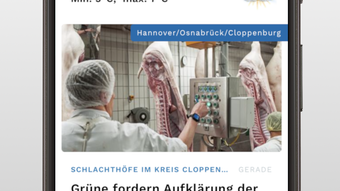
The NWZ app features a clean, intuitive user interface optimized for mobile devices. Navigation is structured around a bottom tab bar, with access to categories, saved topics, and the personalized feed. The layout prioritizes readability, with clear headlines, concise summaries, and visual cues to distinguish between article types. Workflow efficiency is enhanced through direct access to user preferences, enabling quick adjustments to the news feed without navigating multiple menus.
Performance observations are based on general software behavior patterns. The app is reported to operate smoothly on Android devices, with minimal lag during content loading. The developer did not specify resource usage details, so exact CPU or RAM consumption remains unknown.
Stability appears consistent, with no reported crashes or freezes in the initial release. The app maintains responsiveness even when handling multiple content streams, suggesting efficient data handling. Updates are expected to improve performance over time, though current data does not include benchmarks or load testing results.
Compatibility & System Requirements
The NWZ app is designed for Android devices and is compatible with Android 6.0 and later versions. It has a file size of 20 MB, indicating a lightweight installation that does not require significant storage space. The developer did not provide additional system requirements, so exact hardware specifications such as RAM or processor type are not available. Compatibility information was partially provided, with support confirmed for Android OS only. Users should ensure their device meets the minimum OS version to install and run the application.
Installation is straightforward, requiring no special configuration. The app runs entirely on the device, with no cloud dependency for core functionality. Offline access to previously downloaded articles may be available, though this feature was not explicitly stated. Users are advised to check for updates through the Google Play Store to maintain compatibility with future Android releases.
Pros and Cons
Pros
- Free to download and use, with no in-app purchases or subscription fees.
- Offers a personalized news feed based on user preferences.
- Focuses on a specific geographic region, ensuring relevant content.
- Simple, intuitive interface suitable for all age groups.
- Lightweight installation at only 20 MB.
Cons
- Platform availability is limited to Android only.
- Exact performance metrics and system requirements were not specified.
- Limited to news from Northwest Germany and the Netherlands.
- No information on offline reading capabilities.
- Developer has not provided details on update frequency or future feature plans.
FAQ Section
Is NWZ available for iOS devices?
The current release of NWZ is only available for Android. No information has been provided regarding an iOS version.
Is the app safe to download and use?
As a free app developed by Nordwest-Zeitung, it is designed to be secure and free from malware. Users are advised to download it only from official sources such as the Google Play Store.
How often does the app receive updates?
The developer has not disclosed the update schedule. Users should check for updates regularly through the app store.
Can I use NWZ without an internet connection?
Offline functionality was not specified. While some content may be cached, the app likely requires an active internet connection for full operation.
What type of license does NWZ use?
NWZ is distributed as free software with no licensing restrictions. It is intended for personal and non-commercial use.
Final Thoughts
The NWZ app stands out as a focused, user-friendly tool for individuals seeking reliable local news from Northwest Germany and the Netherlands. Its personalized feed and intuitive interface make it easy to stay informed without being overwhelmed by irrelevant content. While the app is currently limited to Android and lacks detailed technical specifications, its lightweight design and free access enhance its appeal. The targeted regional focus ensures high relevance for its intended audience, making it a valuable resource for residents, professionals, and news enthusiasts in the area.
For users who prioritize local journalism and regional updates, NWZ offers a compelling solution. Despite some limitations in platform availability and transparency around performance, the app delivers on its core promise: delivering timely, relevant news in a simple, accessible format. With its clean design and strong regional focus, it is a solid choice for anyone looking to stay informed about developments in Northwest Germany and the Netherlands.
Download NWZ now







